Smart View Script Error at Sign-In: WebView2 Runtime Failed, and the Fix
Oracle Smart View stopped at the login window this week with a script error. The Oracle sign-in address was fine. WebView2 had failed to start, so Smart View fell back to the old Internet Explorer component. Here is why, and what fixed it.
- The script error is a symptom. Smart View could not start WebView2, so it opened the Oracle sign-in page in the old Internet Explorer component. The page does not run there.
- What fixed it for me: I upgraded Smart View from 25.x to 26.200, then restarted the PC. The restart mattered.
- My WebView2 setting in Health Check was already correct. Check your Smart View version first.
What you see
There are two messages. You may see one or both.
The script error. It appears when you connect and the sign-in window opens.
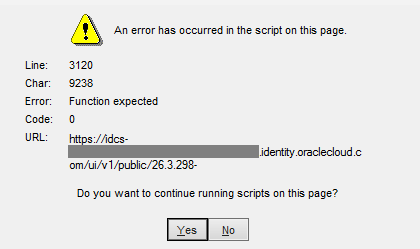
The line and character numbers can differ from mine. The dialog then asks whether to keep running scripts on the page. Neither answer fixes the cause.
The WebView2 warning. Smart View shows this one itself.
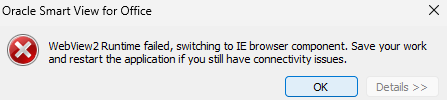
It says "WebView2 Runtime failed, switching to IE browser component". Then it tells you to save your work and restart the application if the connection trouble continues. This message explains the script error.
Why it happens
Smart View shows the Oracle sign-in page in a small browser window inside Excel. Current versions use Microsoft Edge WebView2 for that window. Oracle has required WebView2 on every user's machine since Smart View 25.200 (Oracle).
When WebView2 can't start, Smart View doesn't stop. It switches to the older Internet Explorer component and tries the sign-in there. Oracle describes this switch, and the warning that comes with it, in the 24.100 readme (Oracle). Most of the time nobody notices. It breaks when the sign-in needs something Internet Explorer doesn't support.
- Step 1WebView2 does not startOn your machineSmart View shows the warning
- Step 2Smart View falls backTo the Internet Explorer componentOracle documents this switch
- Step 3The sign-in page failsIts script stops in Internet ExplorerYou see "Function expected"
That was my case. The Oracle identity sign-in page needs a modern browser engine. In the Internet Explorer component, its script stops with "Function expected" and the sign-in never loads.
The address in the error is not the problem. The problem is which browser engine opened it.
The fix that worked for me
I was on a Smart View 25.x release. I upgraded to 26.200 and restarted the PC. Sign-in has worked since.
One detail matters. Right after I installed 26.200, the WebView2 warning still appeared. It cleared only after a full restart of the PC. So do both steps.
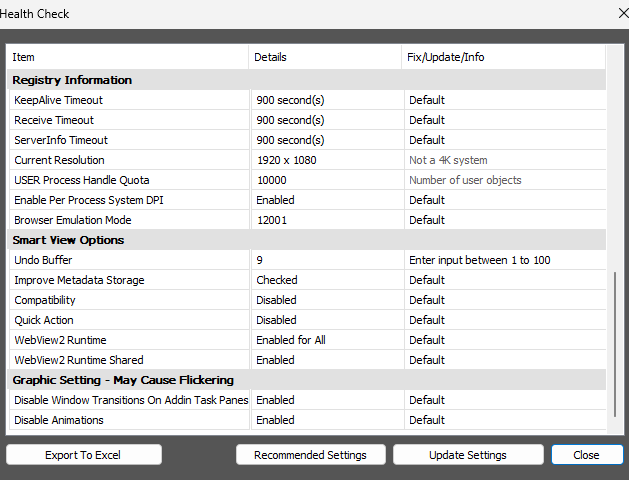
- Check your version. In Excel, open the Smart View ribbon, click the arrow next to Help, and choose Health Check. Under Version Information, read the Smart View version and the WebView2 Runtime version (Oracle).
- Save your work and close every Office app. Excel, Word, PowerPoint and Outlook.
- Download Smart View 26.200 or later. In your Oracle EPM environment, click your user name at the top right, choose Downloads, and follow the Smart View link to Oracle's download page (Oracle). Check the release number before you download. Oracle also lists every release in the My Oracle Support article "Available Patch Sets and Patch Set Updates for Oracle Smart View for Office".
- Run the installer. Oracle recommends Run as administrator where you can (Oracle).
- Restart the PC. Not only Excel.
- Sign in, then check again. Open Health Check and confirm the Smart View version reads 26.200 or later.
I've since heard from a few other Smart View users who had the same error on older versions. Upgrading fixed it for them too.
You may not be able to install software yourself. Send this page to your IT desk and ask for Smart View 26.200.
If it still fails after the upgrade and restart
I didn't need these steps. They are what I would try next, in this order.
- Clear the Smart View WebView2 data. Close all Office apps. In File Explorer, open
%AppData%\Oracle\SmartView\WebViewand clear what is in the folder. Reopen Excel and sign in (Oracle). - Repair the WebView2 Runtime. In Windows Settings, go to Apps, then Installed apps. Find Microsoft Edge WebView2 Runtime, choose Modify, then Repair. You may need admin rights.
- Check that WebView2 is switched on. In Health Check, WebView2 Runtime should read Enabled for All. That has been the default since Smart View 24.100. If your company distributes a properties.xml file,
disableWebView2should be 0 (Oracle). - Check your Windows version. Oracle supports WebView2 with Smart View on Windows 11 only. On Windows Server, each Office app signs in on its own (Oracle).
- Open a service request with Oracle. Attach the Health Check export. The dialog has an Export To Excel button.
What I know, and what I don't
Known. Oracle documents the switch to Internet Explorer. Oracle also recommends the latest Smart View version for full WebView2 support (Oracle). An upgrade and a restart fixed it for me, and an upgrade fixed it for the people I heard from.
Not known. Why WebView2 stopped starting on the older version this month. I haven't found an Oracle note that explains it.
One thing did change on many PCs in early November. Microsoft's WebView2 Runtime updates itself, and it moved to version 157. Developers of other Office add-ins reported start-up problems on that version in Microsoft's public feedback tracker (Microsoft WebView2 feedback). I can't confirm that this is what affected Smart View. If you know the cause, tell me and I'll update this page.
For admins: before more users hit it
If one user hit this, others on the same Smart View version may follow. Three things to do this week:
- Find out which Smart View versions your users run. Health Check shows it on each machine.
- Install 26.200 on one test machine, then plan the rollout with your desktop team.
- Show users what the two messages look like, and tell them who to call.
Smart View is a client install, so nobody gets the new version until someone installs it. I covered what else is in 26.200 in my 26.11 update review.
Questions people ask
Why does Smart View say "WebView2 Runtime failed, switching to IE browser component"?
Smart View could not start Microsoft Edge WebView2, which it uses for the sign-in window. It falls back to the older Internet Explorer component and warns you. Oracle added this warning in Smart View 24.100.
How do I fix the script error when I log in to Smart View?
In my case, upgrading Smart View from 25.x to 26.200 and then restarting the PC fixed it. The script error appears because the Oracle sign-in page was opened in the Internet Explorer component.
Is the Oracle sign-in address wrong?
No. The address in the error is the normal Oracle identity domain address. The page fails because of the browser engine that opened it.
Do I need to change the WebView2 setting in Health Check?
Usually not. Enabled for All has been the default since Smart View 24.100. My setting read Enabled for All and the warning still appeared, so the setting was not the cause.
Which Smart View version do I need?
I'm on 26.200, the current release as I write this. Oracle announced it on October 19, 2026. WebView2 has been a requirement since Smart View 25.200.
Sources
- Oracle, Smart View for Office 24.100 Readme, defect 34676161: the switch to Internet Explorer and the warning. Checked November 19, 2026.
- Oracle, Smart View for Office 26.100 Readme: WebView2 requirement since 25.200 and the latest version recommendation. Checked November 19, 2026.
- Oracle, Microsoft Edge WebView2 Support, Installation and Configuration Guide. Checked November 19, 2026.
- Oracle, Performing a Health Check On Your System. Checked November 19, 2026.
- Oracle, Clearing WebView2 Cookies. Checked November 19, 2026.
- Oracle, Downloading and Installing Clients and Downloading and Running the Smart View Installer. Checked November 19, 2026.
- Oracle Cloud Customer Connect, Smart View 26.200 is now available, October 19, 2026. Checked November 19, 2026.
- Microsoft WebView2 feedback tracker, issue 5806: Runtime 157 and an Excel add-in. Checked November 19, 2026.
I'm an Oracle ACE Pro. That's a community recognition program. I don't work for Oracle or Microsoft, and no vendor paid for this page.
Stuck on a Smart View or Oracle EPM problem?
Book a free 30 minute call. Bring the error and your Health Check export. You leave knowing the next step. No pitch.

Fred Mamadjanov
EPM Solution Architect · Oracle ACE Pro · Vena Certified